Your Mahadev Book ID is far more than just a number — it is your unique identifier, your account key, your record of activity, and your link to every deposit, bet, bonus, and withdrawal you will ever make on the platform. Without a verified ID, you cannot place real-money wagers, you cannot withdraw winnings, and you cannot access exclusive member benefits. That makes the application and approval process the most important first step of your entire betting journey — and knowing exactly where your application stands removes the uncertainty that many new users feel. This guide walks you through every stage of the process, shows you exactly how to check your status at any time, explains what causes delays, and tells you how to speed things up — and what to do if your application doesn’t go through on the first try.
The 4 Stages of Your ID Application — Explained
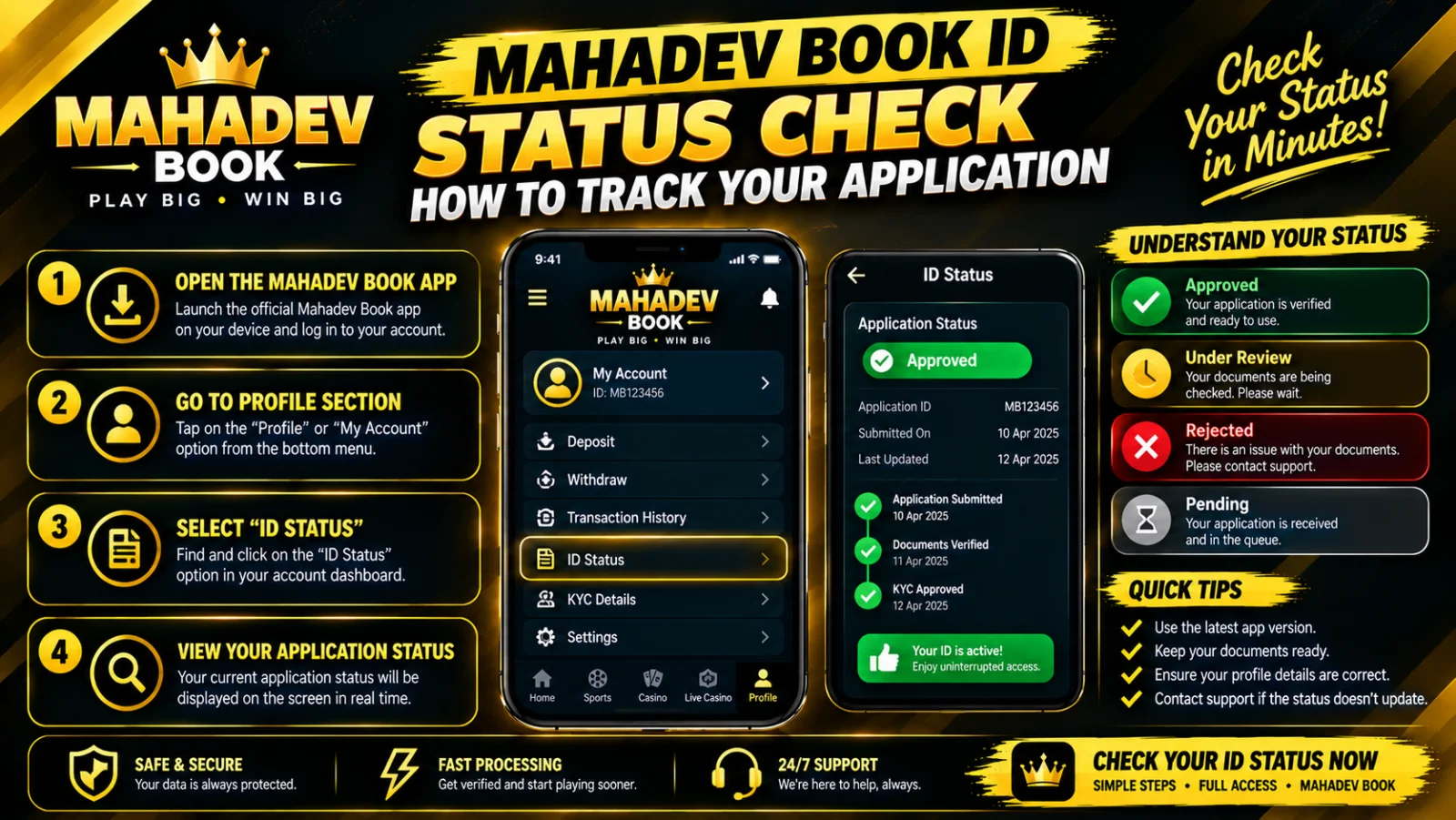
Every verified account follows the same clear progression, accessible through your account dashboard or the dedicated status page at Mahadev Book ID:
Table
| Stage | What It Means | Typical Timeline | What You Should Do |
|---|---|---|---|
| 📝 Submitted | Your form has been received; details are logged in the system | 0–2 hours | Keep your phone active and check messages periodically |
| 🔍 Verifying | Your identity documents are under review; team cross-checks details | 2–24 hours | Respond promptly if additional info is requested |
| ✅ Approved | Verification complete; your ID is active and fully functional | Instant — confirmation sent | Make your first deposit and start betting |
| ⚠️ Additional Info Needed | Something is unclear, incomplete, or mismatched; resubmission requested | Resubmit within 48 hours — faster = faster review | Follow the exact checklist provided in the message |
It is important to note that moving from "Verifying" to "Approved" is not always instant — the review team manually confirms every document to maintain platform integrity and comply with identity standards. This is not a delay without reason: thorough verification protects your account from being linked to duplicate or fraudulent profiles.
3 Ways to Check Your Status — From Fastest to Most Direct
You never need to wonder where things stand. Three independent channels give you real-time updates:
Method 1 — Online Dashboard (Fastest & Always Available)
This is the quickest way — no waiting, no messaging, instant view:
- Go to Mahadev Book and log in using your temporary or reference access
- Your current status appears prominently at the very top of your account homepage — you cannot miss it
- Scroll down to see exactly which documents have been verified and which remain pending
- Check individual item status: Proof of Identity, Proof of Address, Phone Verification, and Payment Matching
- Updates happen in real-time — refresh the page to see the latest change
Method 2 — Dedicated Status Page
If you haven’t set up full dashboard access yet:
- Visit How to Get ID — this is the same page where you originally applied
- Scroll down to the section labelled "Check Application Status"
- Enter your application reference number OR your registered phone number
- Your current stage appears immediately, plus any outstanding requirements or messages from the review team
- Bookmark this page — you can return to it as often as you like without logging in
Method 3 — Direct Support
For personalised updates or if you’re unsure about something:
- Message Customer Support via WhatsApp or live chat
- Provide your application reference number OR registered phone number
- Agents typically reply within 60 seconds with your exact status
- They can also tell you specifically what is being reviewed and whether anything is holding up approval
Common Stuck Points — And How to Clear Them Quickly
Most delays stem from predictable, fixable issues. Before you contact support, check these:
Table
| Hold-Up | Most Likely Cause | Exact Fix |
|---|---|---|
| Blurry or unreadable document photo | Text is fuzzy, edges are cut off, or lighting is poor | Retake in bright daylight without flash; ensure all four corners and every word are visible |
| Name mismatch | Name on your ID differs from name on your payment method or application | Submit a signed note explaining the difference OR provide a second document showing both names |
| Phone number not matching | Number registered on your account does not match one linked to your ID documents | Update your contact details in profile OR submit a separate document proving you own the registered number |
| Document expired | ID has passed its validity date | Provide a current, non-expired government-issued document |
| Underage verification | Date of birth shows you are under 18 | Cannot approve — platform policy requires minimum 18 years of age |
| Duplicate account detected | Existing ID found under same name, phone, or payment details | Contact support to consolidate accounts — having multiple accounts violates terms and can delay approval |
Average Processing Times — Set Your Expectations Realistically
How long should you wait? These are real averages based on typical application volumes:
Table
| Verification Type | Standard Time | Fast-Track (Complete Documents) |
|---|---|---|
| New ID — full documents submitted | 6–24 hours | 2–4 hours |
| Additional documents requested and sent | 1–12 hours | 30–60 minutes |
| WhatsApp expedited review | 1–4 hours | ~1 hour |
| Rejected application — resubmitted | 4–12 hours | 2–4 hours |
Fast-Track Tip: Submit every required document clearly and completely in your very first message. Applications that arrive with everything the team needs get prioritised — cutting approval time by up to 75%. When you leave things for follow-up, your application joins the back of the line each time.
Once Approved — What Happens Next?
When your status changes to Approved, you will receive:
- Your unique Mahadev Book ID number — formatted and permanent; memorise it or store it securely
- Confirmation message via WhatsApp and/or SMS
- Details of your welcome bonus if eligible — automatically credited or ready to claim
- Full access to deposit, bet, withdraw, and explore all sports and markets
- Invitation to Mahadev Book Club — your starting tier and benefits explained
If you don’t receive confirmation within the expected window, check your spam or junk message folder, then contact Customer Support. Occasional delays happen during peak sign-up periods like major tournaments — your application hasn’t disappeared, it’s just in a longer queue.
Keeping Your ID Active — Post-Approval Best Practices
Approval isn’t the end — it’s the beginning. Keep your account in good standing and avoid unexpected restrictions:
- Keep your registered phone number active and accessible — it’s your primary recovery channel
- Update documents before they expire — submit renewed ID well in advance to avoid temporary limits
- Respond promptly to periodic security checks — the platform may request updated confirmation from time to time
- Log in via Mahadev Book Login at least once every 90 days — extended inactivity can trigger a security pause
- Ensure all payment method names match your verified identity — this prevents withdrawal holds later
- Keep your contact details current — if you change numbers, update it in your profile immediately
If Your ID Is Rejected — What Now?
Rejection is rarely permanent. Most rejections are fixable:
- Read the reason provided — it is specific, not generic
- Gather exactly what was requested: clearer photos, different documents, or additional information
- Reapply through the same portal at How to Get ID — your resubmission is flagged as priority
- Typically reviewed within 4 hours rather than the full standard window
- If rejected again, message support directly — they can identify exactly which alternative documents will work for your situation
Never give up after one rejection. Many users are approved on their second or third attempt simply by providing clearer images or the right combination of documents. The team wants you approved — they will guide you through what they need.
Summary — 3 Steps to Your Verified ID
- Apply thoroughly — Complete the form at Mahadev Book ID with accurate details and all documents attached the first time
- Check often — Monitor status via dashboard, status page, or support; respond quickly if anything is requested
- Stay active — Once approved, keep contact details current and log in periodically to maintain full access
Your Mahadev Book ID is the foundation of everything you will do on the platform. Verification isn’t just a requirement — it’s the gateway to faster payouts, higher limits, VIP benefits, and peace of mind. Start your application today at How to Get ID — millions have already completed theirs, and yours could be approved in just a few hours.